
Audio Rack Suite - Radio Automation Software
Download latest Mac version
AudioRack version 4 on the horizon
As of February 2019, work has started on version 4 of AudioRack. This version will bring some major changes, including cross-platform operation on Unix-like systems. This will be an incremental rollout first, with an ARServer re-write, then a re-write of the GUI tools. Initially, the version 3 GUI tools will be usable with the version 4 ARServer for most features. ARServer is being re-writen to make use of the JackAudio2 library and API, allowing it to be compiled for FreeBSD, Linux and OSX. Jack will bring with it some nice features like inter-application audio connections, persisten encoder/recorders, and external/custom audio players and recorders as sources and sinks for AudioRack inputs and outputs. However, ARServer will also require that the JackAudio deamon be running and configured for your studio before ARServer starts. This will complicate "daemon" mode currently available in the ARServer version 3. Also, multiple audio interface factionality and audio processing will be removed from ARServer and moved to external applictions that support this already in Jack. You will need to configure your audio interfaces and effects processing in a jack patchbay befor ARServer starts. The initial version of ARServer will also likely not support the VoIP functionality, but I expect to add that back in soon after.NOTICE: Please use MySQL 5.6 or preferably 5.5 with ARSuite. Recent changes in MySQL 5.7 are incompatible with the default MySQL configuration, requiring some non-trivial changes to work with ARSuite
AudioRack Suite is an open-source radio broadcast automation and live assist system. I started writing AudioRack in 2002 after my experience using a commercial automation system at our local community radio station, KURA. At the time, the system required constant attention as it would crash often, and I was not very pleased with the constraints that the system placed on automation. In the early 1990s, I had written MacAssist, a radio live assist system while I was a student and Engineering Director at The Rochester Institute of Technology's college radio station WITR. While AudioRack has no code in common with MacAssist, it did serve as an early "personal experiment" in radio software, so it deserves mention in the evolution of AudioRack. Initially, I used AudioRack as a file player running alongside the existing automation system at KURA to do my weekly show. This allowed me to build my playlists at home and move everything over to KURA. At the same time, I was also using iTunes and some apple scripts to run automation for an internet radio station that I was running on the side. After starting development, it became apparent to me that the AudioRack project was an opportunity to build a stable, scalable radio automation system from the ground up that would handle all of the things that I wanted: Portable playlists that could be moved with associated media between locations, network access for remote management and control, shared music libraries, software based mixing system to eliminate the need for an external mixing console, and an organic, interactive automation system that adjusts to programming material inserted by live DJs. Pre-generated rotations are not the friend of the live DJ!
Years later, AudioRack Suite is happily running both KURA and KRKQ/MountainChill.com, and new functionality continues to be added. Get involved in the development of AudioRack Suite - help make it into what you need.
Donate
Please help me continue to develop this open-source software. Please make a donation. Suggested - $60 - Ethan & Eric (redmountainradio.com)System Overview
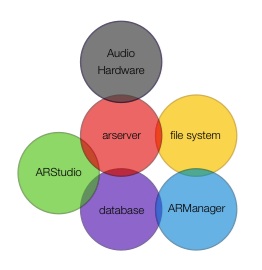
The system is composed of the following components:
- ARServer - multi-client, mutli-bus audio engine.
- Clients - (ARStudio and ARManager) User interfaces to the ARServer and library/automation database.
- Database (MySQL 5.1 and latter supported).
- File System - Audio File Storage, anything from a local hard disk to a networked RAID system.
- Audio Input/Ouput device(s).
ARServer
ARServer manages the playing, recording, and processing of all the audio
- Multi-bus, multi-output mixer can handle live audio input sources, VoIP audio sources, and file based audio sources.
- Extended IAX VoIP protocol allowing AAC-LC coded for high quality mono and stereo remote feeds.
- Manages the current playlist, handling segues, logging item meta-data, performing database queries for automation, etc.
- Support for four live input mute groups and monitor mix-minus functions for it's audio outputs.
- Automatic mix-minus for VoIP feed to callers when an VoIP audio source is live.
- MODBUS TCP relay control hardware is available to control Turntables, CD players, telephone mutes, etc, associated with live inputs and mute groups.
- Audio Processing: 8 AudioUnit processor plugin per player, output, or recorder, processor speed allowing.
- Multiple simultaneous audio file recorders and SHOUTcast mp3 stream encoders from any mix bus or live input source.
- SHOUTcast stream encoder will handle track posting from program logs.
- Broadcast delay - can be applied to any output or recorder.
- Multiple ARServer instances can share a common database library.
- Library and Automation make use of a customizable relational database structure.
- Can be accessed and operated from a simple telnet session, or from the user friendly ARStudio front end client.
ARStudio Client
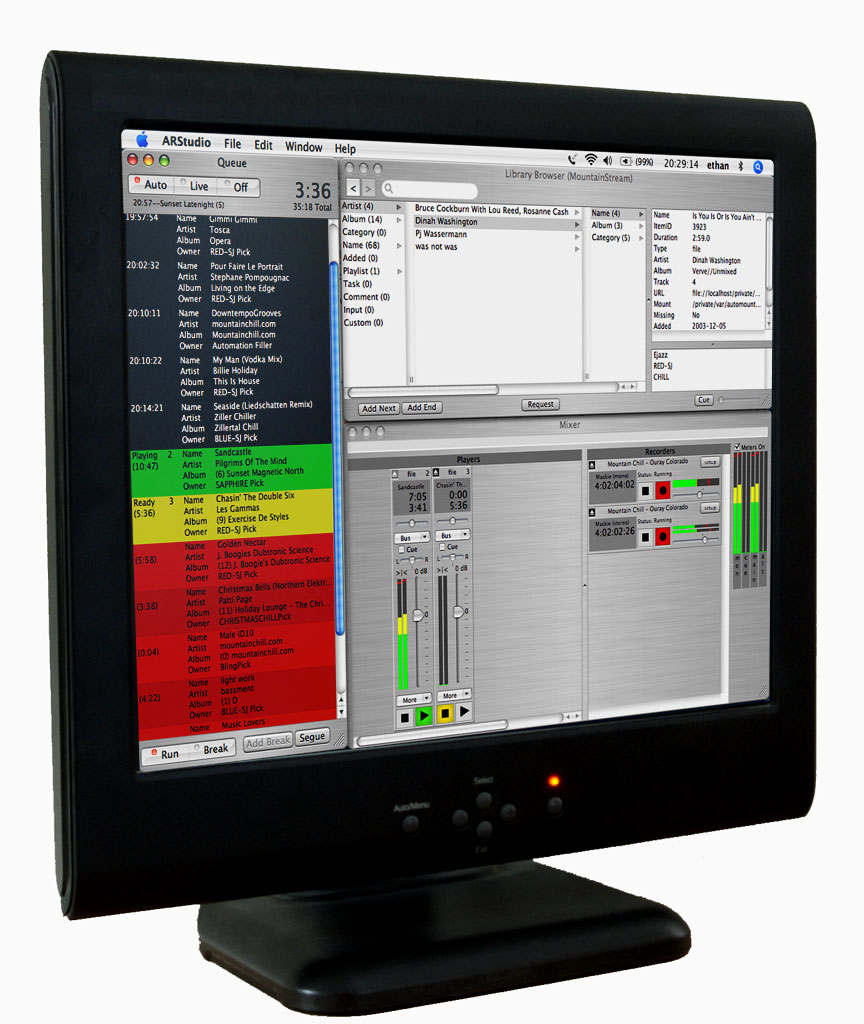
ARStudio is the Live DJ/Studio component of AudioRack Suite
- Full drag and drop and cut, copy paste support.
- Graphical access to all but the most advanced ARServer functions.
- Multiple ARStudio clients can access a single ARServer at the same time.
- Control surface support for most mixer functions.
- Easily switch between multiple servers.
- Intuitive library browser with cross category word search.
- Unattended and Live-Assist automation modes for customizable levels of automation.
- Tight integration with ARManager for library and schedule management, if ARManager is made available on the same machine.
- Command line "Console" window provides access to low level ARServer functions.
- Local or network access to a ARServer and database for both single computer and remote operation.
- SSH tunnel support for secure access to a ARServer and database located behind a network firewall.
- Live DJ scripts for pre-recorded items that should be read when live.
- VoIP client to "call in" to ARServer with a high quality mono or stereo remote feed.
- Responsive even on low speed network connections such as GPRS cellular networks.
- Accurate VU level meters for each input-source, recorder and mix bus, with true peak and R.M.S. displays.
ARManager Client
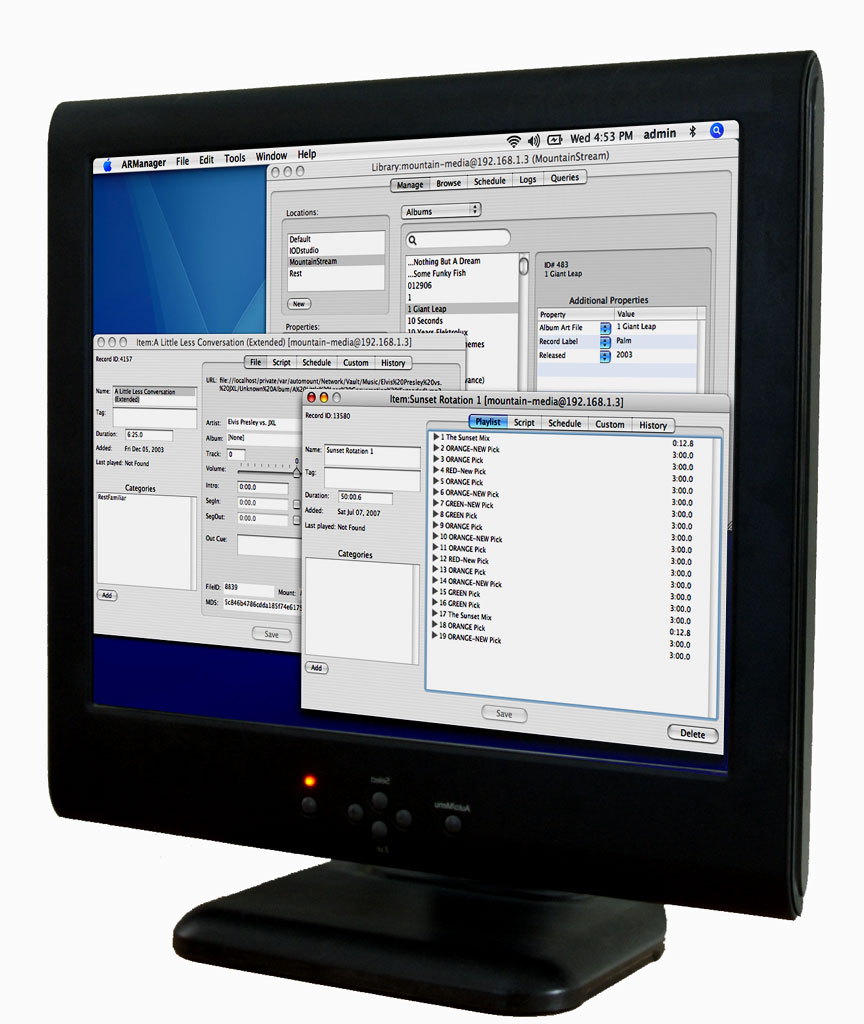
ARManager is the Operations Mangement component of AudioRack Suite
- Intuitive library, automation and schedule management user interface.
- Administer multiple independent libraries or single libraries shared by multiple ARServers.
- Multiple ARManager clients can access a single database at the same time.
- Easily switch between databases.
- Graphical schedule viewer.
- Customizable database queries.
- Full editing of item meta data.
- Tight integration with ARStudio if ARStudio is made available on the same machine.
- Database changes are performed through ACID compliant sessions to prevent corruption.
- Local or network access to a database for both single computer and remote operation.
- SSH tunnel support for secure access to a database located behind a network firewall.
- Multi-window interface for items and libraries, with window to window drag and drop support.
- Item type transparency - Playlists, Files, Tasks, etc are all managed the same.
- Text and XML exporting and reporting from most windows and views.
MAC OS X SYSTEM REQUIRMENTS
- Intel based Macintosh system. This software in NOT a universal binary format.
- OS X 10.6 through 10.9
- At least 256M of RAM, 512M would do you good.
ARServer allocates wired (dedicated, never paged out) memory for all of it's audio buffers. This work out to around 4MB per player at the 44.1ksps file sample rate plus 34MB for an eight channel, 96 ksps mix bus buffer and an additional 8MB per input definition (for mix-minus buffer). - 2.0 GHz x86 single core processor or faster recommended for default 96ksps audio engine sample rate. If the sample rate is reduced to 44.1ksps, a 1.6 GHz processor does fine.
- Access to a MySQL version 5.1 or latter server. Any one interested in helping to add SQLite and PostgreSQL support?